Ordovee
Inventory & warehouse management software

Where digital commerce meets physical operations.

For businesses that handle the goods they sell, Ordovee organizes inventory intake, stock quantities, storage locations, orders and fulfillment — and connects them to your sales on eBay and Shopify.

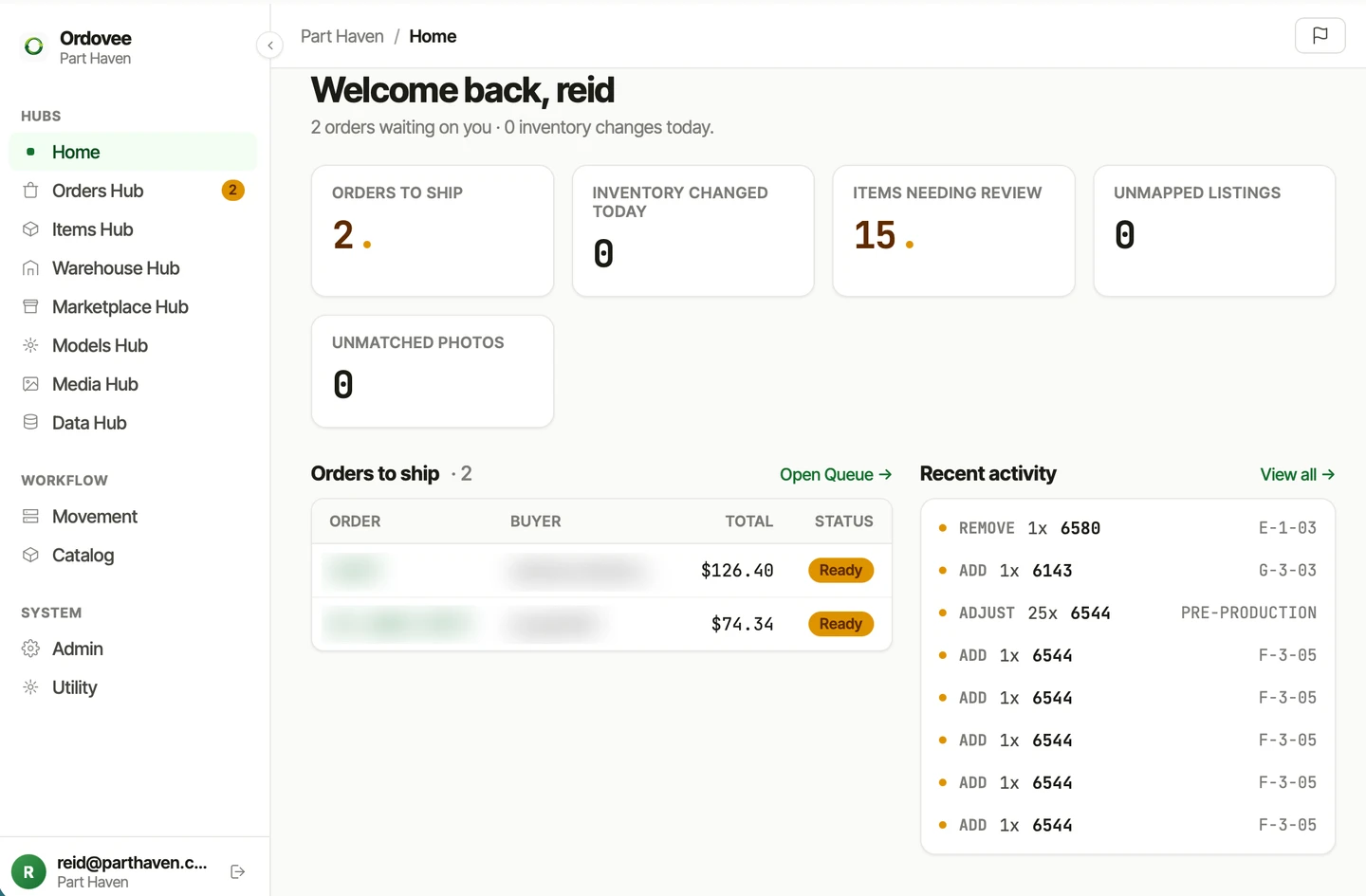
The Ordovee app dashboard — orders ready to ship, inventory stat cards, and a recent-activity ledger of inventory movements.
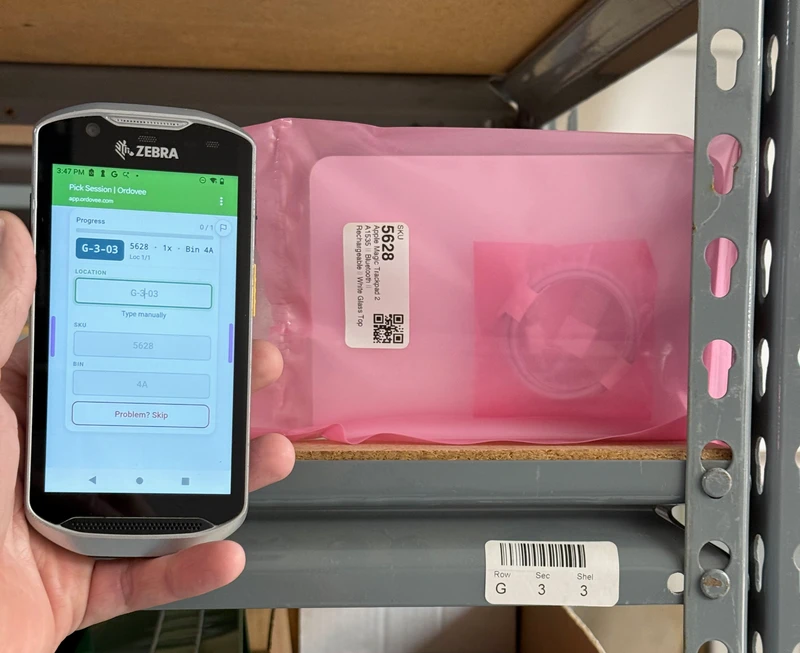
A Zebra handheld held up at a labeled shelf location, showing an Ordovee pick beside the item in its labeled bag.
How Ordovee works

Online sales. Hands-on inventory. One organized operation.

Every item should have a known identity, quantity, location and history. Every sale should connect to an accountable inventory change and, where it applies, a repeatable fulfillment process.

  1. 01
    Inventory intakeNew stock gets an item record, a SKU and a starting quantity.
  2. 02
    LocationsEach item is put away to a labeled location you can scan.
  3. 03
    Quantity changesStock is added, removed, moved and adjusted, and the record changes with it.
  4. 04
    ReservationsAn order holds the stock it needs, so the quantity available to sell goes down.
  5. 05
    FulfillmentGuided picking shows the next location in location-code order, with scans verifying each pick before packing.
  6. 06
    AccountabilityCounts check the shelf against the record, and the ledger’s history helps explain any difference.
The inventory record
Each item’s identity, quantity, location and history, with every movement kept in the permanent ledger.

Restocks and returns come back in as intake, and the cycle continues.

The inventory record
Each item’s identity, quantity, location and history, with every movement kept in the permanent ledger.
  1. 1Inventory intakeNew stock gets an item record, a SKU and a starting quantity.
  2. 2LocationsEach item is put away to a labeled location you can scan.
  3. 3Quantity changesStock is added, removed, moved and adjusted, and the record changes with it.
  4. 4ReservationsAn order holds the stock it needs, so the quantity available to sell goes down.
  5. 5FulfillmentGuided picking shows the next location in location-code order, with scans verifying each pick before packing.
  6. 6AccountabilityCounts check the shelf against the record, and the ledger’s history helps explain any difference.

Restocks and returns come back in as intake, and the cycle continues.

Sales channels · eBay and Shopify

Orders in, available quantities out.

Orders inSupported orders arrive in Ordovee automatically, are matched to your item records, and reserve the stock they need.
Available quantities outWith auto-push enabled, Ordovee sends each item’s updated available quantity to its matched listings.

Already selling? Start from what you have.

Ordovee can create its item records from the eBay listings and Shopify products you already have — supported listings that carry a SKU — or from a CSV file, so your catalog doesn’t start from scratch. Current marketplace quantities can become your opening counts, in one place, ready to review. Then record where things actually sit, one shelf at a time, without reorganizing the warehouse first.

Start Ordovee with your existing eBay listings
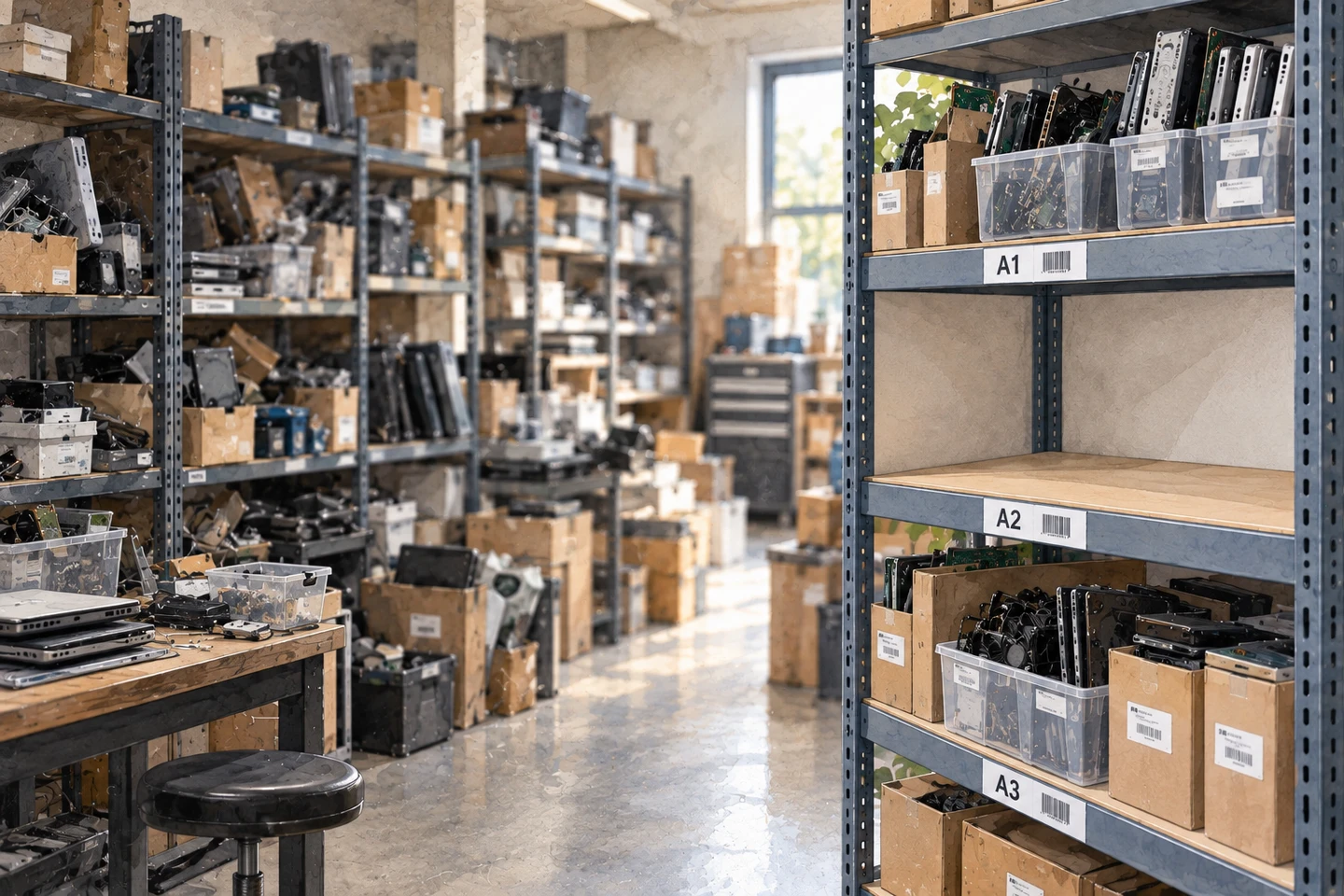
A storage room mid-organization: one steel rack carries printed location labels A1, A2 and A3 and holds sorted items in labeled bins, while the shelves behind it are still unlabeled.
Who it’s for

Defined by the way your inventory comes in and goes out

Our customers are people responsible for making online sales work in the physical world.

Where a business sells is a separate choice: a dismantler may sell on eBay and a general reseller on Shopify. Many businesses fit more than one of these, and the list isn’t exhaustive.

  • General merchandise resellers

    Varied, constantly changing stock, much of it one of a kind — every item identified, recorded, stored, found again and shipped.

    Know what you have, where you put it, and what remains available to sell.

    Used electronics, collectibles, clothing, tools and household goods.

  • Replenishable inventory retailers

    Several units of established SKUs: new stock raises the quantity, while sales and reservations lower what’s available.

    Maintain one reliable inventory picture as stock comes in and orders go out.

    Specialty retailers and online stores that restock the same products.

  • Liquidation and returns resellers

    Goods arrive in mixed, inconsistent batches and may need identifying before they can be sold.

    Turn mixed incoming merchandise into identifiable, organized, sellable inventory.

    Customer-return resellers, closeout buyers, mixed-pallet and surplus operators.

  • Refurbishers

    Items may be tested, cleaned, repaired or evaluated before they’re ready to offer.

    Keep control of inventory as acquired goods become ready for sale.

    Computer and appliance refurbishers, and equipment repair-and-resale shops.

  • Dismantlers and parts recovery operators

    Complete assemblies come in, and their valuable parts have to be recovered, identified and cataloged — often in a catalog the business builds itself.

    Turn dismantled equipment into organized, traceable, sellable inventory while preserving the knowledge behind every part.

    Electronics dismantlers, salvage and equipment recovery businesses, and generalist dismantlers.

What it does

Four capabilities, one inventory record

One connected system, not four separate products. Every capability works from the same item records and the same permanent ledger.

An item detail page in Ordovee showing its recent-activity ledger — dated add, adjust and remove entries, each with location, quantity change and reason.

Inventory management

What you have, how much is available and what happened to it — item records, quantities, reservations and the movement history behind every count.

The Ordovee Warehouse hub on a laptop, listing locations by code, beside a label printer, printed location and item labels, a scanner and labeled shelving.

Warehouse management

Where inventory is stored and how it’s handled — location codes and labels, guided picking and counts that verify the shelf.

The Ordovee orders queue — ready orders from eBay and Shopify with order, buyer, total, age and status columns; order numbers and buyer names blurred.

Order fulfillment

What sold and what has to happen next — orders brought in and matched to inventory, stock reserved, then picked, packed and recorded.

The Apps dashboard in Ordovee — eBay and Shopify connections, sync health, listing coverage, push-queue counts and a recent-activity log.

Sales channel coordination

Whether what you offer for sale matches what you have — with auto-push enabled, Ordovee sends updated available quantities to matched eBay and Shopify listings, alongside drift checks and a list of stocked items with no active listing.

Structured Disassembly Management

When inventory starts as a complete assembly

Most inventory starts as an identifiable product. A dismantling operation starts with a complete machine — its valuable parts still to be found, recovered, identified and cataloged, often with compatibility knowledge the business must build and maintain itself.

Structured Disassembly Management (SDM) is the discipline Ordovee defines for that work. It runs on the same inventory foundation as everything above: Parts Intelligence supplies the specialized capabilities — source assemblies, compatibility searchable both ways, and part-out valuation — and SDM applies them from the first evaluation to the final sale.
  1. 01Evaluate. Estimate what an assembly’s parts could bring — with your own last twelve months of sales shown for the parts that have sold — and save the estimate.
  2. 02Acquire and identify. Record the source assembly. Has this one been cataloged before?
  3. 03Recover. Each recovered part becomes its own item record.
  4. 04Catalog. Link each part to the assemblies it fits, starting with the one it came from.
  5. 05Organize. Locations, quantities and the ledger, as for every other item.
  6. 06Sell and fulfill. Through the same orders, picking and sales channels.
Build your own parts catalog
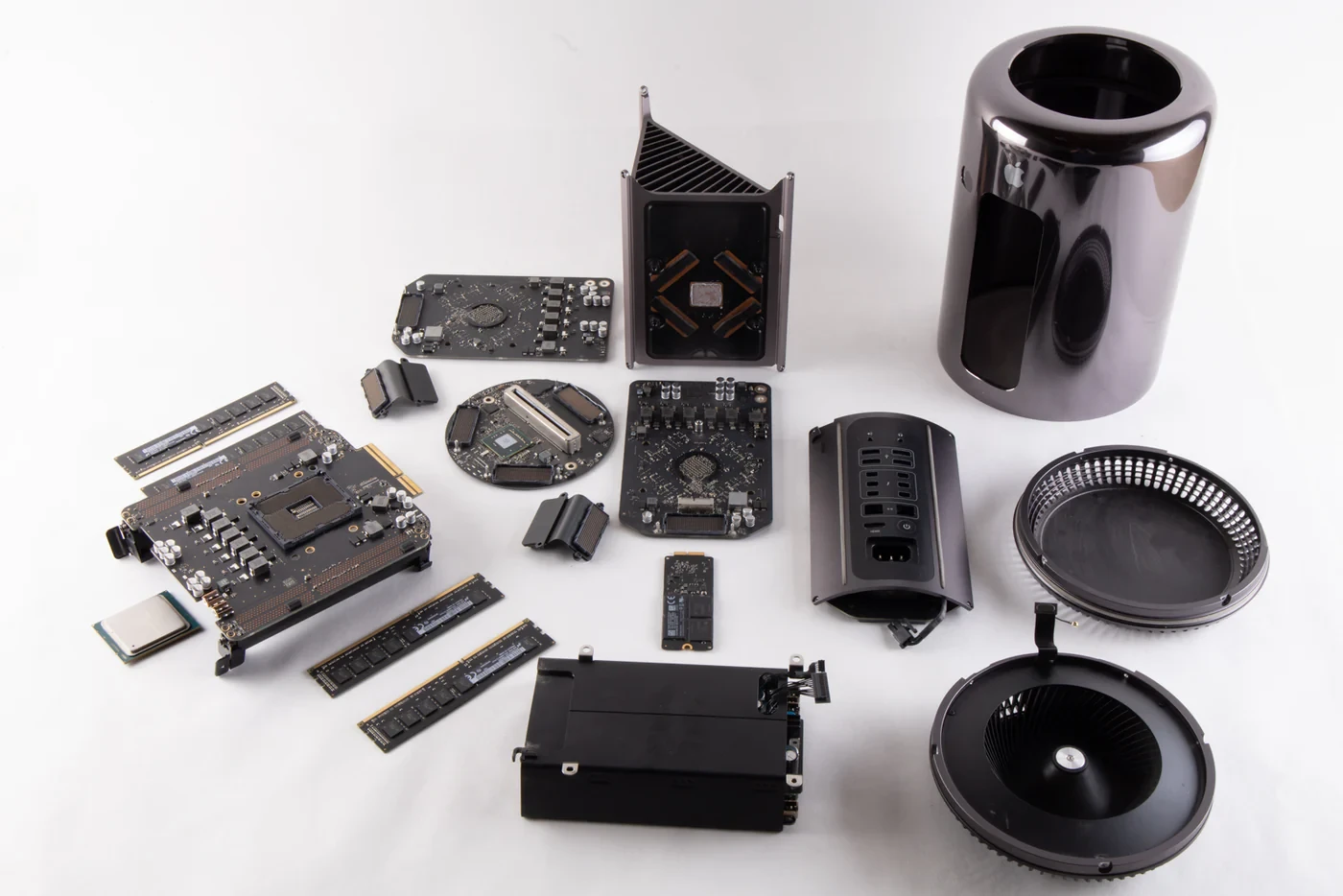
A Mac Pro fully torn down at Part Haven — case, logic boards, memory modules, storage, fans and housing laid out in an organized grid.
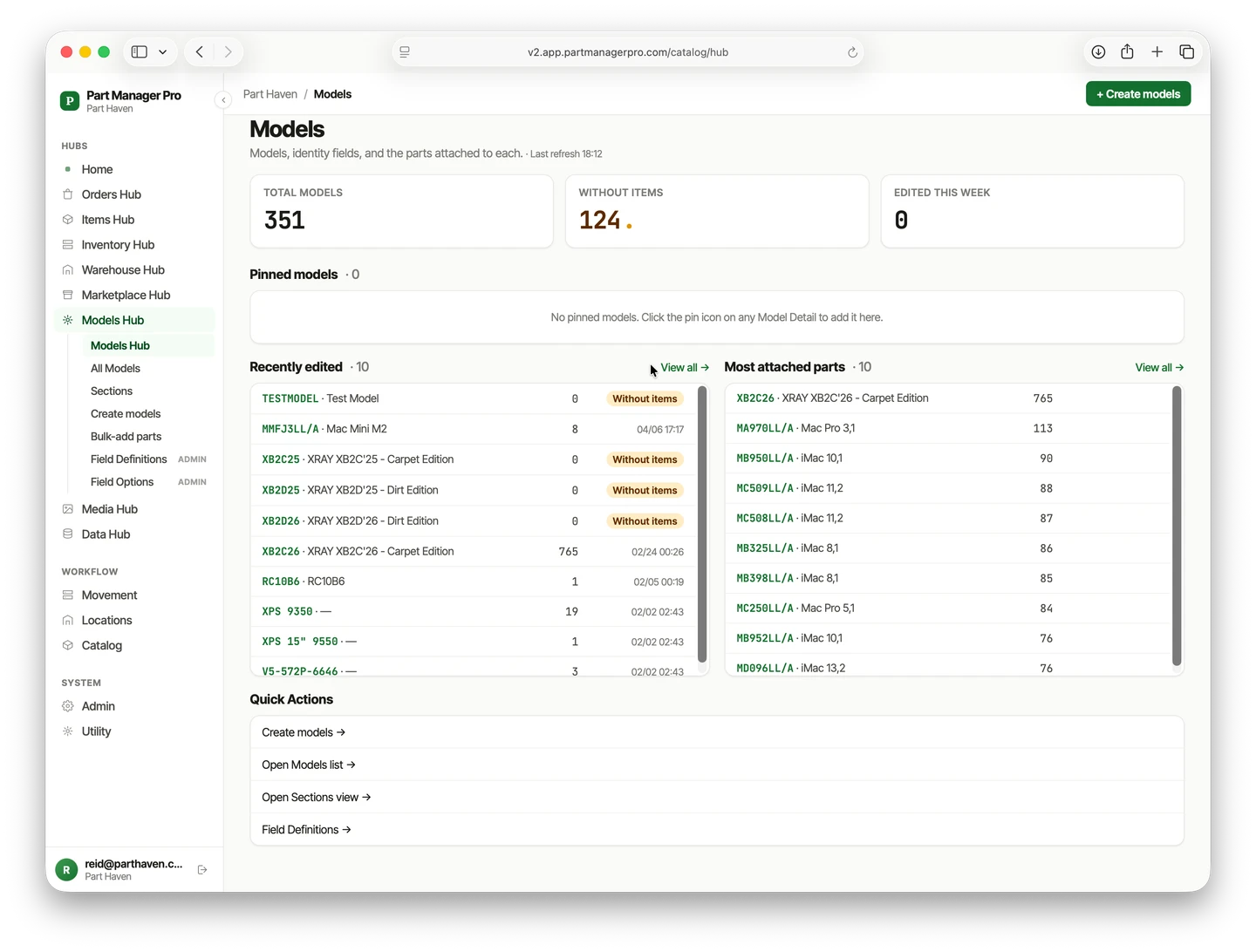
The Ordovee Models hub, listing a catalog of source assemblies and the parts attached to each.
Part Haven’s parts room — steel shelving stocked with labeled bins and anti-static bags, each spot labeled.
Proven in operation

Built inside a working operation

Ordovee was built at Part Haven, a parts recovery business, where it runs the daily work. The app screens on this page come from that operation, as do the photographs of its parts room and a Mac Pro teardown.

What you can check for yourself
Next steps

Try it free, or keep exploring

Free tools · no account needed

SKU & location label generator

Enter a SKU or location code, pick a size and barcode type, and download a print-ready PDF for any thermal printer.

Open the label generator

Part-out value calculator

List the parts you’d pull with a price and shipping for each — marketplace fees and what you’d pay for the unit come off the top.

Open the calculator

See whether Ordovee fits your operation

Walk through your operation with us See pricing

Plans differ by scale, never by locked features.